

FactCheck
See what AI engines get wrong about your brand, compared with your own facts, and track how accurate they are with the Trust Score. Beta.
FactCheck (Beta) compares what AI engines say about your brand with your own facts. It shows which claims are wrong or out of date, where they come from, and what to fix.
Open it from AI Visibility → FactCheck in the sidebar.
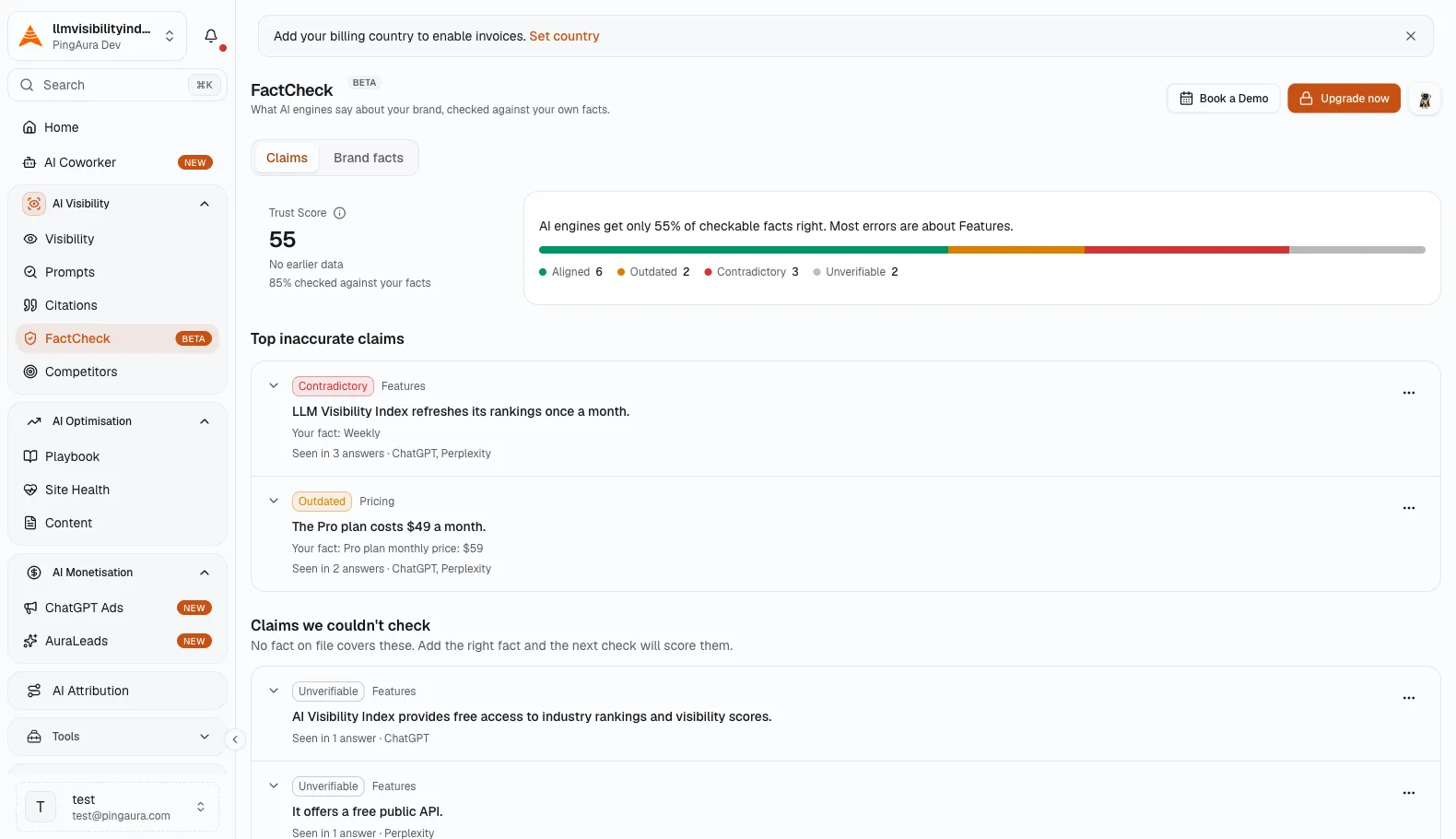
How claims are labelled
FactCheck reads the AI answers from your visibility runs and finds the claims they make about your brand. Each claim gets one of four labels:
- Aligned: matches your facts.
- Outdated: was true once, but your facts have changed since.
- Contradictory: goes against your facts.
- Unverifiable: your facts don't cover it, so it can't be checked.
Trust Score
The Trust Score runs from 0 to 100. It is the share of checkable claims that are right.
- Unverifiable claims are left out of the score.
- The score needs at least 5 checkable claims. With fewer, no score is shown.
The page also shows how the score has moved over time.
Wrong claims
The page lists the wrong claims AI engines repeat most often. For each one you see:
- the answers that made the claim, and how many there are
- the engines that said it
- the sources the engines cited
- your correct fact
Brand facts
The Brand facts tab holds the facts FactCheck compares against. The first check suggests some from your site. You can confirm or reject those, add your own, edit them and supersede them. Each fact has:
- a topic
- a subject and a value
- an optional effective date, from when the fact is true
- an optional source URL
When a fact changes, supersede it with the new value. FactCheck then labels claims that still use the old value as Outdated.
The more complete your facts are, the fewer claims end up Unverifiable.
Correct a label
If FactCheck gets a claim wrong, open the claim's menu and choose:
- Not about us: the claim is about another brand or product.
- This verdict is wrong: the label is wrong, for example the claim is actually correct.
The claim is removed from your score, and your choice also applies to later checks. Claims you set aside are listed on the Brand facts tab. Click Undo to put one back.
Playbook items
An Outdated or Contradictory claim seen in 2 or more answers becomes an item in the Playbook, with FactCheck as its source. At most 5 FactCheck items are open at a time.
An item closes by itself once AI engines state your current fact.
When checks run
A check runs by itself after each visibility run. There is nothing to start.
Plans and limits
FactCheck is on the Starter plan and up. The number of answers checked each time depends on your plan:
| Plan | Answers checked per check |
|---|---|
| Starter | 50 |
| Growth | 150 |
| Pro | 300 |
| Enterprise | 600 |
On the Free plan, FactCheck shows as a locked card.
Where else it shows
- Home: a FactCheck tile with your Trust Score.
- AI Coworker: ask "What are AI engines getting wrong about us?"
- MCP server: the
get-fact-checktool returns the Trust Score, the most repeated wrong claims and the open FactCheck Playbook items.